
AI Follow-up Emails
Minutes after a call ends, a follow-up email is drafted from the transcript — matched to what you actually promised. Review, edit, send.
PepoSmart reads the transcript of a recorded meeting, identifies the primary commitment you made, and drafts a matching follow-up email with the attendees already added. Drafts wait in a review queue — nothing is sent without you. Approved action items from the same analysis can sync to any of ten CRMs on Professional and above.
| Available on | Starter and above. CRM sync of action items requires Professional and above. |
|---|---|
| Requires | A recorded meeting with AI Meeting Notes, and a connected sending account. |
| Limits | One draft per recorded meeting, bounded by your plan's recording allowance. |
| Last verified | 19 September 2026 |
The follow-up is where deals die: you promised pricing, a demo link, a proposal — and then Tuesday happened. PepoSmart reads the transcript of every recorded meeting and drafts the follow-up for you, matched to what was actually said. Promised pricing? The draft is a pricing email. Agreed to send resources? That's what it writes.
Drafts wait in a review queue — nothing sends without you, ever. Edit, personalise the placeholders, hit send, and the action items extracted from the same analysis sync to your connected CRM so it stays honest too. PepoSmart supports ten CRMs, and CRM sync requires the Professional plan or above.
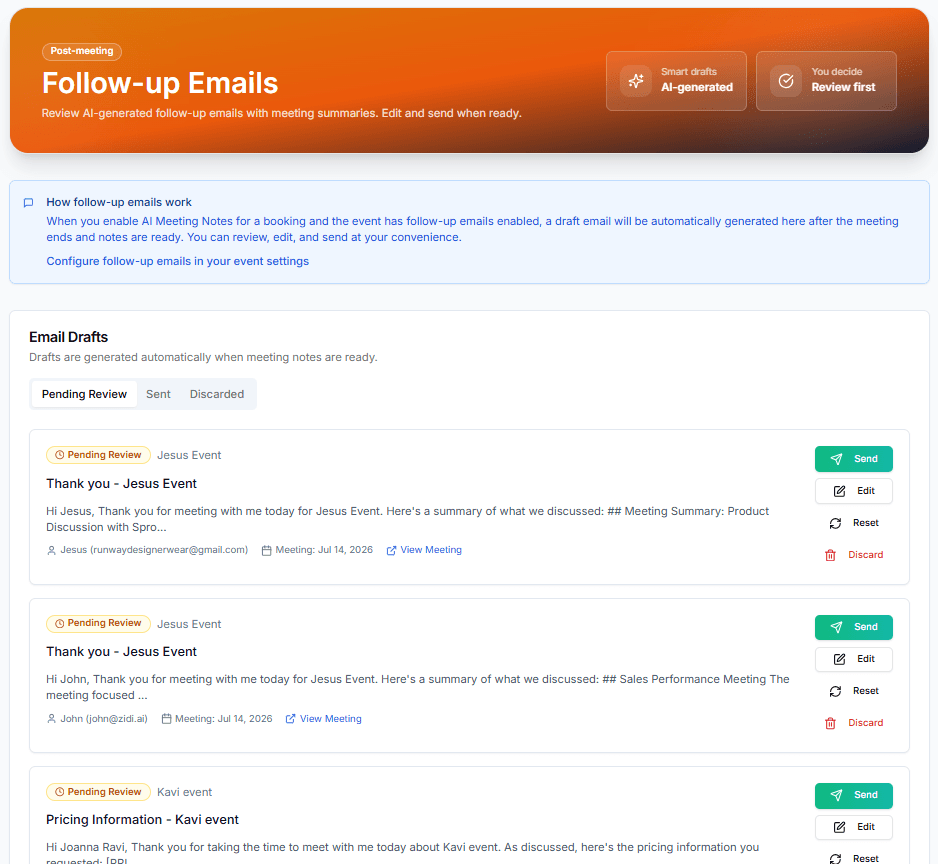
What you can do with AI Follow-up Emails
Drafted from the transcript
Not a generic template — the draft includes a summary of the meeting and addresses the specific commitments you made on the call.
Matched to your promises
Pricing, proposal, demo link, resources, scheduling the next step, or a plain thank-you — the draft type follows the action items detected in the call.
You always review first
Drafts queue as Pending Review. Edit, send, or discard — nothing goes out automatically.
How it works
- 1
Enable follow-ups on an event
Turn on follow-up emails for events that have AI Meeting Notes enabled.
- 2
Finish your meeting
When notes are ready, the AI analyzes commitments and drafts the right kind of follow-up.
- 3
Review and send
Open the draft, fill any placeholders (like the actual pricing), tweak the tone, and send.
- 4
CRM stays in sync
Action items from the same analysis sync to HubSpot or Salesforce automatically.
Everything included
- Automatic drafts minutes after meeting notes are ready
- Draft types matched to detected commitments: pricing, proposal, demo, resources, answers, thank-you
- Meeting summary included in the email body
- Review queue with Pending / Sent / Discarded states
- Edit and regenerate drafts before sending
- Custom follow-up subject and body templates per event
- Action items sync to HubSpot and Salesforce
- Works per event — enable it only where you want it
What AI Follow-up Emails does not do
The limits, stated up front rather than discovered later.
- Drafts are never sent automatically. Review and send is always a human step.
- The draft reflects what the AI heard, so it can misread a commitment — read it before sending.
- Per-event custom subject and body override the generated template.
Frequently asked questions
Will emails ever send without my approval?+
No. Every draft waits in the review queue until you explicitly send it — or discard it.
How does it know what kind of email to write?+
The AI analysis extracts action items from the transcript. If you promised pricing, it drafts a pricing email with a placeholder for the numbers; if you promised a demo link, it drafts that instead.
Can I customize the templates?+
Yes — each event can have a custom follow-up subject and body, and you can edit any draft before it goes out.
Try AI Follow-up Emails today
The free plan includes unlimited booking pages and unlimited scheduled meetings, plus 2 AI recordings to try the notetaker.
AI Follow-up Emails is available on: Starter and above. CRM sync of action items requires Professional and above.
Get started freePlans, limits and integrations on this page come from our product facts registry. If anything here disagrees with that page, the product facts page is correct — please tell us at support@peposmart.com.
Related features
AI Meeting Notes
An AI notetaker joins your Zoom, Google Meet, or Teams call, records it in HD, and delivers a transcript, summary, and action items minutes after you hang up.
Email Templates
Write it well once, reuse it forever — templates for broadcasts, sequences, and follow-ups.
CRM Integrations
Ten CRMs, one behaviour: bookings create the contact, recorded meetings get logged, and approved action items become follow-up tasks.