
AI Meeting Notes
An AI notetaker joins your Zoom, Google Meet, or Teams call, records it in HD, and delivers a transcript, summary, and action items minutes after you hang up.
PepoSmart's AI notetaker joins your Zoom, Google Meet or Microsoft Teams meeting as a visible participant, records it, and produces a transcript with speaker labels, a structured summary, action items with owners and priorities, a sentiment and buyer-intent read, and a follow-up email draft. It requires a supported online meeting and is metered by plan.
| Available on | Starter and above for ongoing use. Free includes 2 recordings for the lifetime of the account. |
|---|---|
| Requires | An event whose location is a Zoom, Google Meet or Microsoft Teams meeting, with AI notes switched on, and recording allowance remaining. |
| Limits | Every plan: 2 AI recordings for the lifetime of the account, with credit packs for more on any paid plan. Retention: 7 days on Free; no scheduled expiry on paid plans. |
| Last verified | 19 September 2026 |
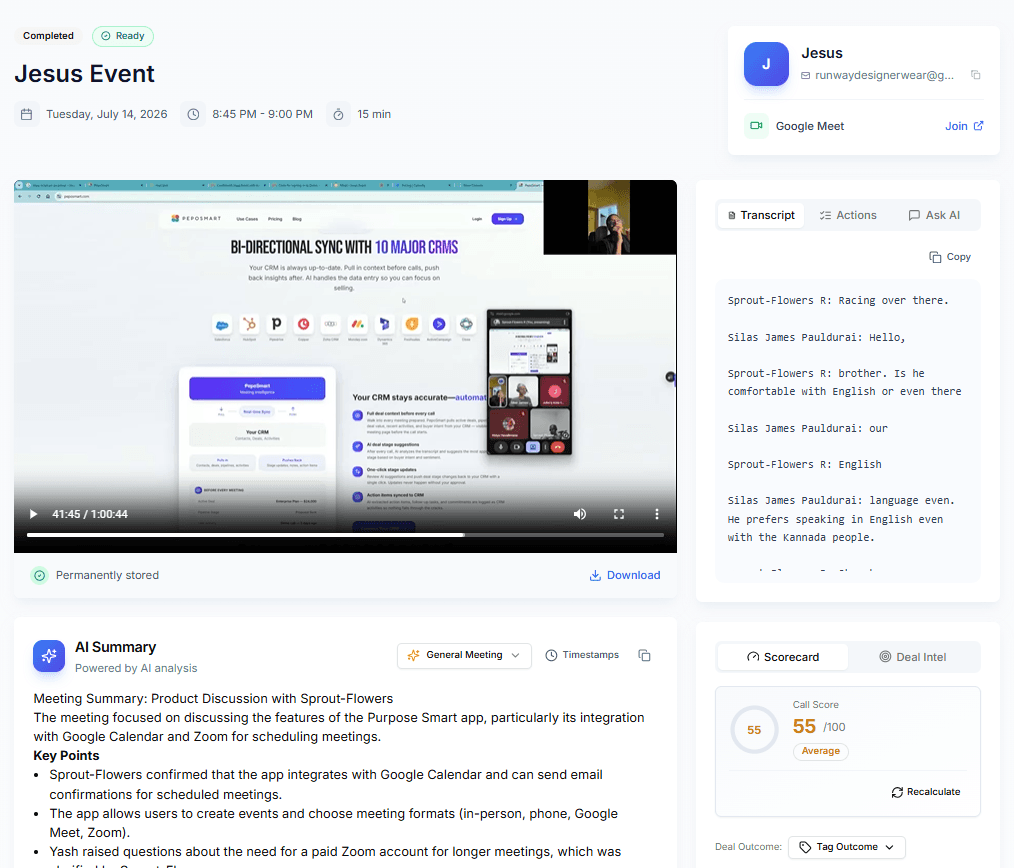
Enable AI Meeting Notes on an event and a notetaker joins the call as a visible participant. It records, transcribes with speaker names, and turns the conversation into something you can act on: a summary with key points, action items with owners and priorities, the meeting's sentiment, and the buyer's intent. It works on Zoom, Google Meet and Microsoft Teams meetings — the notetaker joins an online meeting, so phone calls and in-person meetings cannot be recorded.
Recordings do not vanish either. On paid plans a recording is retained for the life of the account with no scheduled expiry, so "what did we agree in March?" stays one click away with the transcript and analysis attached. Free accounts keep each recording for 7 days.
What you can do with AI Meeting Notes
Records and transcribes your online calls
The notetaker joins Zoom, Google Meet, and Microsoft Teams meetings as a visible participant, records them, and produces a full speaker-labeled transcript.
AI summary in minutes
Key points, decisions, action items with owner and priority, sentiment, and buyer intent — generated automatically right after the call ends.
Recordings that stay put
Paid plans retain recordings with no scheduled expiry, and you can delete any of them yourself. Free accounts keep each recording for 7 days.
How it works
- 1
Toggle AI Meeting Notes on an event
One switch per event type — every booking of that event gets the notetaker automatically.
- 2
The notetaker joins your call
It appears in the participant list in Zoom, Meet, or Teams, so everyone on the call can see the meeting is being recorded. Obtaining any consent your jurisdiction or organisation requires remains your responsibility as host.
- 3
Notes arrive minutes later
Recording, transcript, AI summary, action items, sentiment, and buyer intent land on the meeting page.
- 4
Everything downstream lights up
The same analysis powers follow-up drafts, coaching scorecards, relationship tracking, and chat with meetings.
Everything included
- Works with Zoom, Google Meet, and Microsoft Teams online meetings
- Cannot record phone calls or in-person meetings
- The notetaker joins as a visible participant — never a silent one
- Video recording with playback and download
- Full transcript with speaker labels
- AI summary with key points and decisions
- Action items with owner and priority
- Sentiment and buyer-intent analysis per meeting
- Retained with no scheduled expiry on paid plans; 7 days on Free
- 2 lifetime AI recordings on every plan, including Free, Business and Enterprise; paid plans add more with AI recording credit packs
- Recordings that fail — a denied waiting room, a changed link, no usable audio — do not count against your allowance
- Feeds follow-up emails, scorecards, and relationship intelligence
What AI Meeting Notes does not do
The limits, stated up front rather than discovered later.
- Phone calls and in-person meetings cannot be recorded — the notetaker joins an online meeting as a participant.
- The notetaker is always visible in the participant list. There is no hidden or silent recording mode.
- Obtaining any notice or consent your jurisdiction or organisation requires is the host's responsibility.
- Recording can fail — a denied waiting room, a changed link, no usable audio. Failed recordings do not consume your allowance.
- Transcription quality varies with audio quality, accents, crosstalk and language.
Frequently asked questions
How many AI recordings do I get?+
Every plan, including Free, includes 2 AI recordings for the lifetime of the account; no plan has a monthly allowance and none is unlimited. Paid plans can add recordings at any time with credit packs (shared across the team, valid for 30 days). Scheduling and bookings are unlimited on every plan and are never metered.
Do participants see the notetaker?+
Yes. It joins as a visible participant in the meeting, so everyone on the call can see that recording is happening. PepoSmart does not offer a hidden or silent recorder. Meeting hosts remain responsible for any notice or consent their jurisdiction or organisation requires.
Can PepoSmart record phone calls or in-person meetings?+
No. The notetaker records by joining an online meeting as a participant, so it requires a Zoom, Google Meet or Microsoft Teams link. Phone calls, dial-in conferences and in-person meetings cannot be recorded.
How long are recordings kept?+
On paid plans a recording is retained for the life of the account with no scheduled expiry, and you can delete any recording yourself from its meeting page. Free accounts keep each recording for 7 days, after which it is deleted automatically.
What happens when a recording fails?+
Recording can fail — the notetaker may be denied entry from a waiting room, the meeting link may change, or there may be no usable audio. A failed recording does not consume your plan allowance. Transcription quality also varies with audio quality, accents, crosstalk and language.
Which platforms are supported?+
Zoom, Google Meet, and Microsoft Teams — the same platforms PepoSmart auto-creates links for when someone books you.
Try AI Meeting Notes today
The free plan includes unlimited booking pages and unlimited scheduled meetings, plus 2 AI recordings to try the notetaker.
AI Meeting Notes is available on: Starter and above for ongoing use. Free includes 2 recordings for the lifetime of the account.
Get started freePlans, limits and integrations on this page come from our product facts registry. If anything here disagrees with that page, the product facts page is correct — please tell us at support@peposmart.com.
Related features
Coaching Scorecards
Every recorded call gets a score out of 100 — talk ratio, questions, filler words, pace — with trends and personalized exercises to improve.
AI Follow-up Emails
Minutes after a call ends, a follow-up email is drafted from the transcript — matched to what you actually promised. Review, edit, send.
Chat With Meetings
Ask questions about your entire meeting history in plain English — 'What commitments did I make last week?' — and get answers with sources.