
Chat With Meetings
Ask questions about your entire meeting history in plain English — 'What commitments did I make last week?' — and get answers with sources.
PepoSmart lets you ask plain-English questions across the meetings it recorded and indexed for you — for example 'what commitments did I make last week?' — and answers with citations to the meetings the answer came from. You can also question a single meeting's transcript from that meeting's page.
| Available on | Starter and above. |
|---|---|
| Requires | Recorded, indexed meetings. Unrecorded conversations are not searchable. |
| Limits | No cap on questions asked. Scope is your own meetings. |
| Last verified | 19 September 2026 |
Your meetings contain answers you can no longer find: the discount you floated in March, the feature the customer asked about twice, the commitment you made and forgot. Chat With Meetings indexes the meetings PepoSmart recorded for you and lets you ask across all of them at once, in plain English. It can only answer from meetings that were recorded and indexed — anything said on an unrecorded call is not there, and deleting a meeting removes it from the index.
It's a meeting assistant, not a search box. Ask 'summarize my meetings this week', 'what topics come up most often', or 'find discussions about pricing' — the assistant reads across your transcripts and answers with the context of everything you've said in every call.
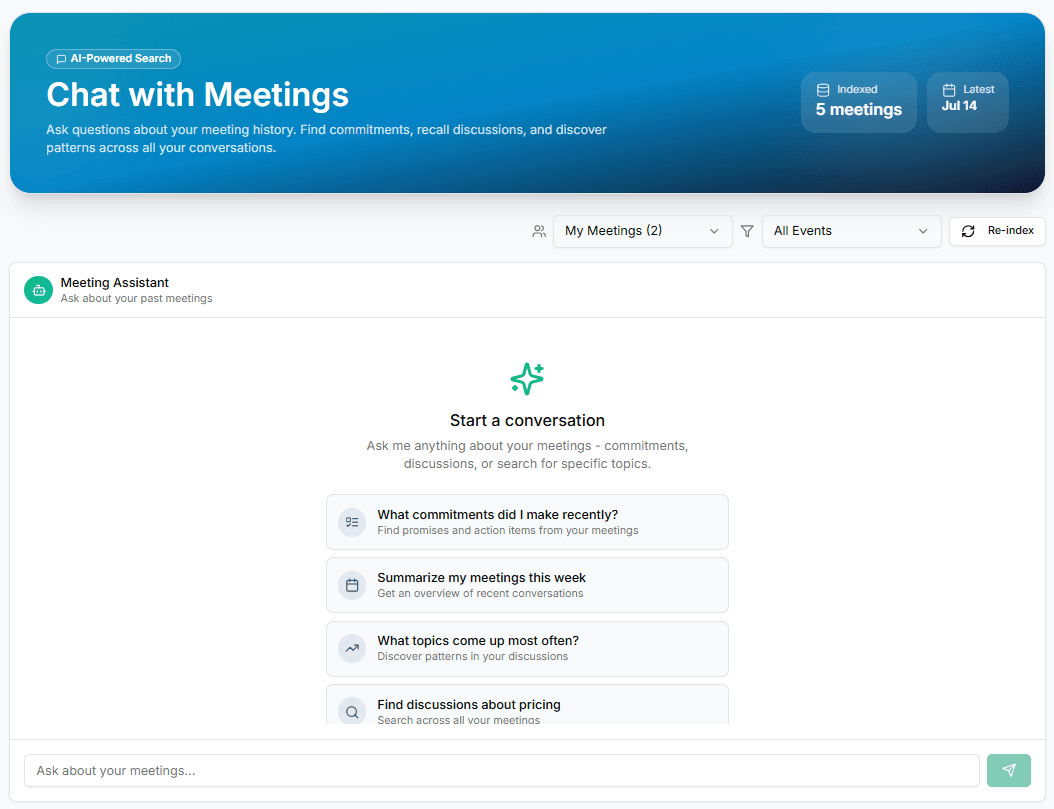
What you can do with Chat With Meetings
Plain-English questions
No filters or keyword games — ask like you'd ask a colleague who attended every one of your meetings and forgot nothing.
Answers across all meetings
The assistant searches your own indexed history at once — commitments, topics, pricing discussions, patterns. It answers from your meetings only, and cites the meetings an answer came from so you can check it.
Scoped when you want it
Filter to your meetings or a specific event type, and re-index on demand so new calls are immediately askable.
How it works
- 1
Record meetings
Every AI-recorded meeting is transcribed and indexed for the assistant automatically.
- 2
Ask anything
Type a question — or start from suggestions like 'What commitments did I make recently?'
- 3
Get grounded answers
Answers come from your actual transcripts, so you can jump into the source meeting for full context.
Everything included
- Natural-language Q&A over your meeting history
- Finds commitments, promises, and action items
- Summarizes recent meetings on demand
- Surfaces recurring topics and patterns
- Scope by event or team member's meetings
- Re-index on demand for the freshest answers
- Suggested starter questions built in
- Also available per-meeting as 'Ask AI' on any recorded call
What Chat With Meetings does not do
The limits, stated up front rather than discovered later.
- It answers only from meetings that were recorded and indexed. Anything said on an unrecorded call is not there.
- Deleting a meeting removes it from the index, so the assistant can no longer answer from it.
- Access to meeting notes is a per-member team permission — a teammate without it cannot query your recordings.
- Answers inherit transcription errors and can misread context. Open the cited source before acting on anything important.
Frequently asked questions
What kinds of questions work best?+
Anything a perfect-memory colleague could answer: 'What did I promise Jesus last call?', 'Summarize this week', 'Which meetings discussed pricing?', 'What objections come up most?'
Which meetings can it see?+
Every meeting recorded with AI Meeting Notes that has been indexed. You can filter scope and re-index anytime from the chat page.
Can I ask about a single meeting too?+
Yes — every recorded meeting has an 'Ask AI' tab where you can question just that call's transcript.
Whose meetings can it see?+
Your own. On a team, access to meeting notes and transcripts is a per-member permission, so a teammate without that permission cannot read or query your recordings.
What happens if I delete a meeting?+
Deleting a meeting removes it and its transcript from the index, so the assistant can no longer answer from it.
Can it be wrong?+
Yes. The assistant answers from transcripts, so it inherits any transcription errors, and it can miss or misread context. Every answer cites the meetings it came from — open the source and check anything you are going to act on.
Try Chat With Meetings today
The free plan includes unlimited booking pages and unlimited scheduled meetings, plus 2 AI recordings to try the notetaker.
Chat With Meetings is available on: Starter and above.
Get started freePlans, limits and integrations on this page come from our product facts registry. If anything here disagrees with that page, the product facts page is correct — please tell us at support@peposmart.com.
Related features
AI Meeting Notes
An AI notetaker joins your Zoom, Google Meet, or Teams call, records it in HD, and delivers a transcript, summary, and action items minutes after you hang up.
Relationship Intelligence
Every contact gets a health status — Growing, Stable, Declining or At risk — built from sentiment trends and commitments across all your meetings with them.
AI Call Prep
A one-click briefing before your next meeting: who you're meeting, what happened last time, and what's still open.