
Unlimited Booking Pages
Create as many bookable event types as you want — even on the free plan — and share one clean link that fills your calendar.
PepoSmart booking pages are public scheduling links where invitees pick a time from the slots you are genuinely free. You can create unlimited event types and take unlimited bookings on every plan, including Free, each with its own duration, location, intake questions and appearance. Availability is checked against your connected calendars before a slot is offered.
| Available on | All plans, including Free. Event types and bookings are never metered. |
|---|---|
| Requires | A connected Google or Outlook calendar, so PepoSmart can see your busy times. |
| Limits | No cap on event types, bookings, or booking pages. Up to ten additional guests per booking. |
| Last verified | 19 September 2026 |
A booking page is your personal scheduling front door: a public link (app.peposmart.com/book/your-name) where anyone can pick a time that works for both of you. No back-and-forth emails, no double bookings — invitees only ever see slots you're actually free.
Unlike most schedulers, PepoSmart doesn't ration event types. A 15-minute intro call, a 30-minute demo, a 60-minute consultation, a private VIP link — create them all on any plan, including free. Each event gets its own duration, description, location, intake questions, and look.
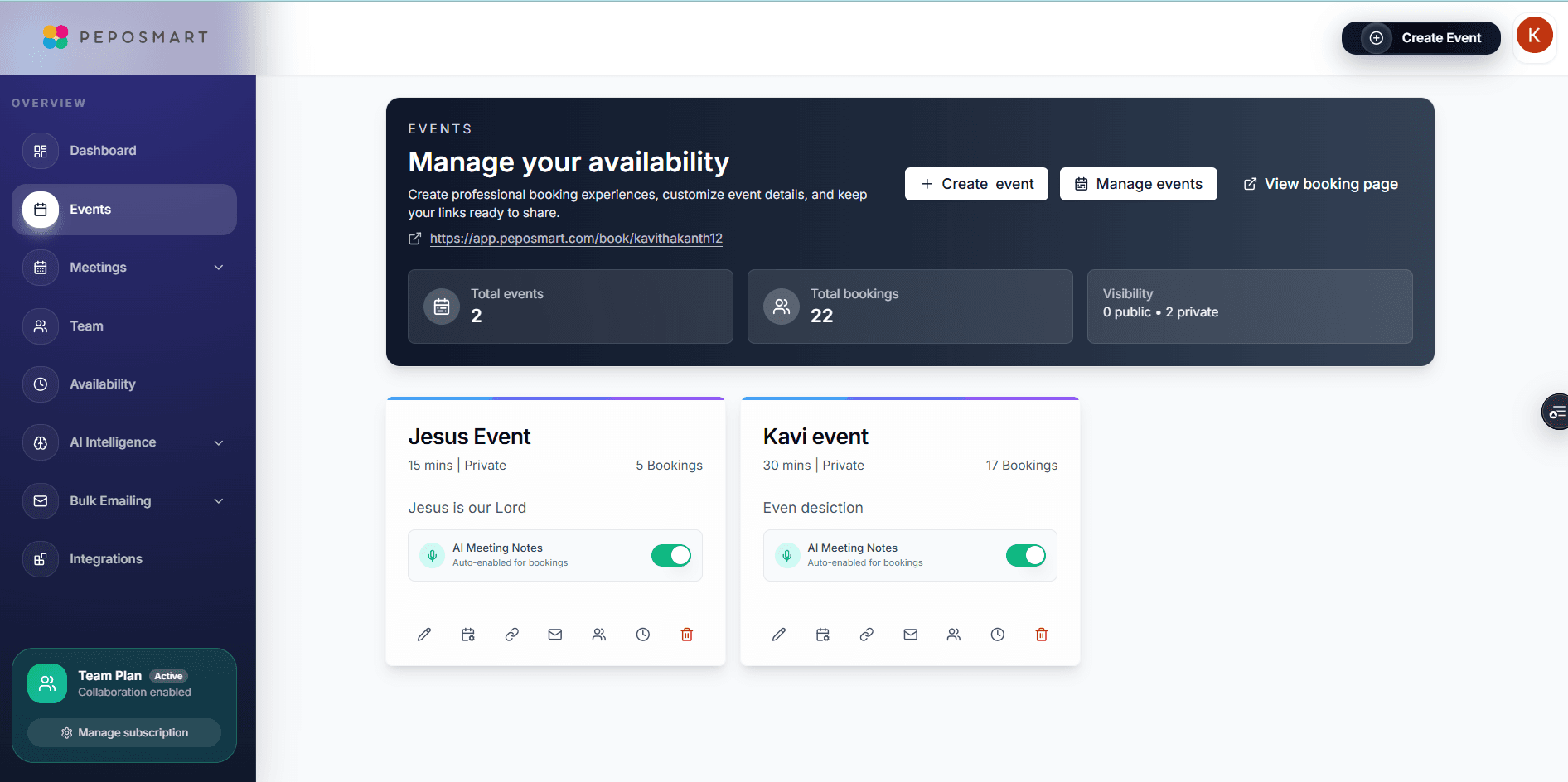
What you can do with Unlimited Booking Pages
Unlimited event types, free
Create separate bookable events for every kind of meeting you run — intro calls, demos, consultations, office hours. No one-event-type cap on the free plan.
Custom intake questions
Ask invitees exactly what you need before the call — company, goals, budget, anything. Answers land in the booking so you're never walking in blind.
Share it anywhere
One link for email signatures and DMs, a QR code for slides and print, an embed for your website, and a redirect URL to send invitees anywhere after booking.
How it works
- 1
Connect your calendar
Sign up and link Google Calendar or Outlook. PepoSmart reads the busy times on your connected calendars and hides those slots. Events on calendars you have not connected are not visible to PepoSmart and cannot be checked.
- 2
Create an event type
Set the duration, location (Google Meet, Zoom, or Microsoft Teams link auto-created), description, and any intake questions.
- 3
Share your link
Send your booking page, embed it on your site, or drop the QR code in a deck. Invitees pick a slot in their own timezone.
- 4
Meetings book themselves
Confirmations and reminders go out automatically, the calendar invite is created, and the conferencing link is attached.
Everything included
- Unlimited event types on every plan, including free
- Unlimited scheduled meetings — no monthly booking caps
- Public booking pages and private, link-only events
- Custom intake questions per event
- Auto-created Google Meet, Zoom, or Microsoft Teams links
- QR code generated for every event
- Embed the booking page on WordPress, Wix, or Squarespace
- Post-booking redirect to any URL you choose
- Add a video to your event page to introduce yourself
- Automatic confirmation and reminder emails
- Conflict checking against your connected calendars — see the caveat below
What Unlimited Booking Pages does not do
The limits, stated up front rather than discovered later.
- PepoSmart can only check calendars you have connected. An event on an unconnected calendar is invisible to it and will not block a slot.
- Payment collection on a booking page requires the Professional plan or above.
- There is no browser extension and no mobile app; booking pages are managed in the web app.
Frequently asked questions
Is the number of bookings really unlimited on the free plan?+
Yes. Free accounts get unlimited event types and unlimited scheduled meetings. Only AI meeting recordings are metered on the free plan (2 lifetime recordings to try the AI features).
Can invitees book in their own timezone?+
Yes. Your availability is defined in your timezone and automatically displayed in each invitee's local time, so a 2 PM slot in New York shows as 8 PM in Berlin.
Can I make an event private?+
Yes. Private events don't appear on your public booking page — only people you send the direct link to can book them.
What happens after someone books?+
Both sides get a confirmation email, the meeting lands on your connected calendar with the conferencing link attached, and reminder emails go out before the call.
Can PepoSmart double-book me?+
PepoSmart checks your connected calendars before it offers a slot and checks again when the booking is submitted, so a slot that is already busy is not offered. The limit is what PepoSmart can see: an event on a calendar you have not connected, or a commitment that is not on any calendar, cannot be checked. Connect every calendar that holds your real availability.
Try Unlimited Booking Pages today
The free plan includes unlimited booking pages and unlimited scheduled meetings, plus 2 AI recordings to try the notetaker.
Unlimited Booking Pages is available on: All plans, including Free. Event types and bookings are never metered.
Get started freePlans, limits and integrations on this page come from our product facts registry. If anything here disagrees with that page, the product facts page is correct — please tell us at support@peposmart.com.
Related features
Availability Rules
Weekly hours, buffers, minimum notice, date overrides, and holidays — total control over when people can book you.
Website Embeds
Put your booking page on your own website — WordPress, Wix, Squarespace — plus QR codes and redirect links.
Payments at Booking
Charge for your time when the meeting is booked — Stripe and PayPal, built into your booking page.