
Team Events
Invite teammates, control what each person can access, and host events together — with team-wide analytics built in.
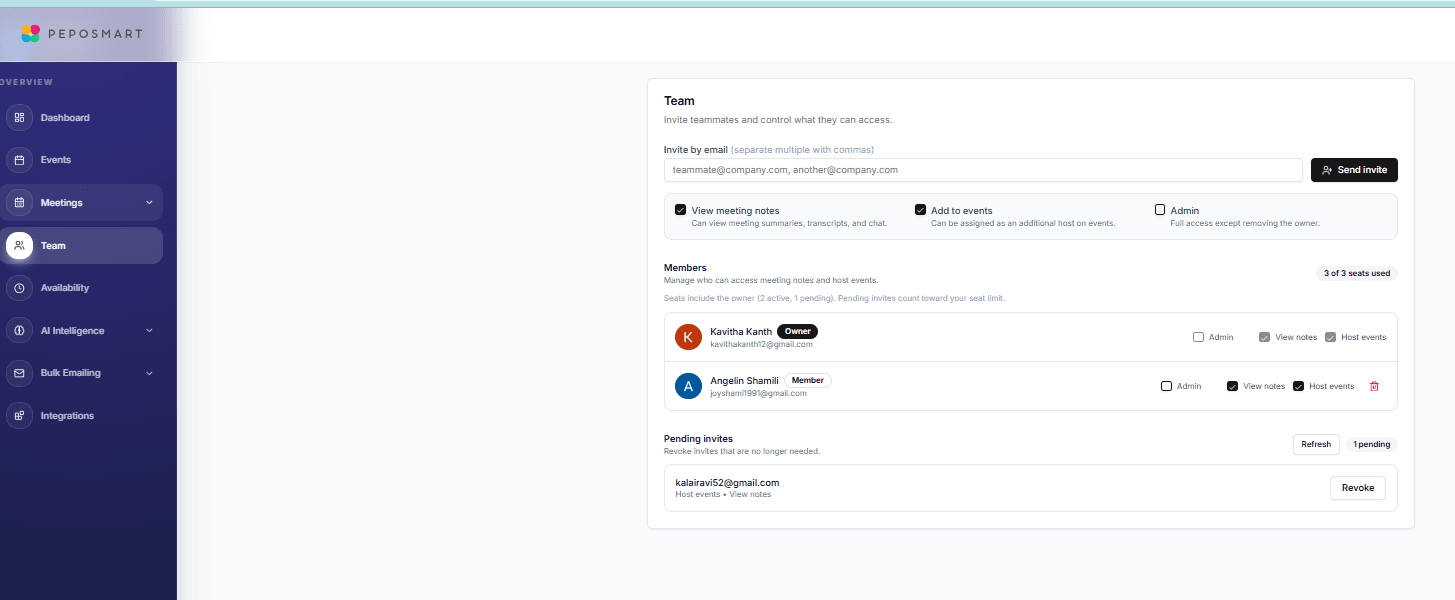
PepoSmart team events let several teammates host from one booking link. On a round-robin event, PepoSmart assigns each booking to an available host using their availability schedule, calendar conflicts, per-host meeting limits and how recently they were last assigned. Roles and per-member permissions control who can host and who can read meeting notes.
| Available on | Any paid plan. The Free plan is owner-only. |
|---|---|
| Requires | At least one teammate who has accepted an invitation. Each accepted teammate is one billed seat. |
| Limits | No seat cap on paid plans. Pending invitations reserve a seat until accepted or revoked. |
| Last verified | 19 September 2026 |
Team events turn PepoSmart from a personal scheduler into your team's meeting layer. Invite teammates by email, give each one exactly the access they need — host events, view meeting notes, or full admin — and add multiple hosts to a single event. Round-robin events share incoming bookings across the hosts who are free.
Because scheduling and AI meeting intelligence live in one product, your team's meetings automatically roll up into shared analytics: volume, hours, call scores, follow-ups sent, and feature adoption, with a member leaderboard that shows who's carrying the load.
What you can do with Team Events
Roles and per-member permissions
Owner, admin, and member roles — plus granular toggles per person for hosting events, viewing meeting notes, and admin access.
Round-robin assignment
Share one link across the team and let PepoSmart pick the host. It chooses from hosts who are free, weighing each host's availability schedule, calendar conflicts, per-host meeting limits, and how recently they were last assigned.
Multi-host events
Add several hosts to one event type. Each host's own schedule and calendar conflicts are respected when invitees pick a time.
Team performance analytics
Meeting volume, hours, action items, follow-ups, response times, call scores, and feature adoption — per member and team-wide.
How it works
- 1
Invite your teammates
Send email invites (separate multiple addresses with commas). Pending invites count toward your seats and can be revoked anytime.
- 2
Set permissions per person
Choose for each member: can they host events, view meeting notes and transcripts, or administer the team?
- 3
Create shared events
Add teammates as hosts on event types. Availability respects every host's schedule.
- 4
Watch the team dashboard
Team performance analytics aggregate meetings, hours, call scores, and follow-ups across everyone automatically.
Everything included
- Email invitations with expiring, revocable invite links
- Owner, admin, and member roles
- Per-member permissions: host events, view notes, admin
- Multiple hosts on a single event type
- Per-host schedule routing on shared events
- Team performance dashboard with member leaderboard
- Meeting volume, hours, and call-score tracking per member
- Feature adoption tracking across the team
- Per-user pricing: Starter $6, Professional $9.50, Business $29/user/month — no seat minimums, 12-month free trial
- No seat cap on paid plans — every teammate you add is one billed seat
- Round-robin events distribute bookings across eligible hosts automatically
What Team Events does not do
The limits, stated up front rather than discovered later.
- There are no routing or qualification forms in front of the calendar, and no weighted or territory-based distribution.
- Round-robin assignment considers availability and recency; it does not read ownership from your CRM.
Frequently asked questions
How does team pricing work?+
Every paid plan is billed per user with no seat minimums — Starter $6, Professional $9.50, or Business $29 per user per month (roughly two months free billed annually), and each starts with a 12-month free trial on a new subscription. Add teammates anytime; each adds a prorated seat, and every seat gets the plan's full features.
Can I control who sees meeting notes?+
Yes. 'View meeting notes' is a per-member permission — teammates without it can host and book meetings but can't open recordings, transcripts, or AI summaries.
How do multi-host events pick available times?+
Invitees only see slots that work for the hosts based on each host's schedule and calendar conflicts, so nobody gets double-booked.
Is there a limit on how many teammates I can add?+
No. Paid plans have no seat cap — each teammate you add becomes one billed seat on the subscription, and pending invitations reserve a seat until they are accepted or revoked. The Free plan is owner-only. Larger organisations that need custom terms, invoicing or a contractual SLA should contact us about Enterprise.
Does PepoSmart support round-robin scheduling?+
Yes. On a round-robin event, PepoSmart assigns each booking to one of the event's eligible hosts, choosing from the hosts who are free at that time. The assignment considers each host's own availability schedule, conflicts on their connected calendars, their per-host meeting limits, and how recently they were last assigned.
Try Team Events today
The free plan includes unlimited booking pages and unlimited scheduled meetings, plus 2 AI recordings to try the notetaker.
Team Events is available on: Any paid plan. The Free plan is owner-only.
Get started freePlans, limits and integrations on this page come from our product facts registry. If anything here disagrees with that page, the product facts page is correct — please tell us at support@peposmart.com.
Related features
Unlimited Booking Pages
Create as many bookable event types as you want — even on the free plan — and share one clean link that fills your calendar.
Coaching Scorecards
Every recorded call gets a score out of 100 — talk ratio, questions, filler words, pace — with trends and personalized exercises to improve.
Availability Rules
Weekly hours, buffers, minimum notice, date overrides, and holidays — total control over when people can book you.