
Short answer
PepoSmart Professional is our highest-rated all-in-one option for businesses that want appointment scheduling and native AI meeting notes in one product. It combines booking pages, recordings, transcripts, summaries, action items, follow-up drafts, payments, and CRM workflows. Its main drawbacks are that every plan includes only 2 lifetime AI recordings, with further recordings bought as credit packs, the absence of a native SMS-reminder option in the account we tested, and a smaller ecosystem than longer-established competitors.
HubSpot Sales Hub Professional is the strongest choice for teams already centered on HubSpot CRM. Its native Notetaker connects recordings, transcripts, and summaries to CRM records, but the relevant plan is substantially more expensive and carries an onboarding fee.
Cal.com Free, Acuity Starter, and LunaCal were tested with Fathom Team. These combinations produced AI meeting notes, but they remain two-product stacks with separate administration, pricing, permissions, data processing, and troubleshooting. Zoho Bookings was tested with Zoho Meeting Professional and Zia, which keeps the workflow within the broader Zoho ecosystem but not within Zoho Bookings alone.
The main buying decision is therefore not simply which scheduler has the most features. It is whether you prefer a native scheduling-and-notes workflow or a modular stack assembled from a scheduler and meeting assistant.
Six recommendations at a glance
These are best-for recommendations, not a claim that one ordering will suit every buyer:
- PepoSmart Professional — best all-in-one scheduling and native meeting-intelligence workflow
- HubSpot Sales Hub Professional — best CRM-native option for established HubSpot teams
- Acuity Starter + Fathom Team — best for paid appointments and client intake
- Cal.com Free + Fathom Team — best modular option for customization and developer control
- LunaCal + Fathom Team — best for content-rich booking pages
- Zoho Bookings + Zoho Meeting Professional with Zia — best for Zoho-centric businesses
Important disclosure
PepoSmart publishes this guide and sells PepoSmart, one of the products evaluated. This creates a commercial interest that readers should know about.
We address that conflict by naming the exact configurations tested, applying the same criteria, linking to current official sources, publishing meaningful PepoSmart limitations, and identifying situations in which competitors are a better fit. No vendor paid for inclusion, and the rankings are not based on affiliate commissions.
The article was written and reviewed internally by PepoSmart personnel. The reviewer checked product accuracy and methodology; this is not an independent third-party endorsement. Editorial ratings are our judgment from the disclosed test and should not be confused with G2, Capterra, or other customer-review scores.
How we selected and tested these Calendly alternatives
We included products to which our testing team had access and that provide a public booking page capable of replacing a meaningful Calendly scheduling use case. Each product had to let an invitee select a time without creating an account.
Our hands-on review covered account setup, event creation, availability, booking-page configuration, email and SMS reminders, paid meetings, themes, round robin, group and collective scheduling, and the AI-notes workflow. We checked GDPR and security information from current vendor documentation; we did not conduct a legal or technical compliance audit.
The screenshots in this article establish which product environments and configurations we accessed. They are not presented as proof of features outside the screen shown.
Exact products and access tested
| Product | Configuration tested | What we tested directly | AI notes tested? |
|---|---|---|---|
| PepoSmart | Professional | Scheduling, reminders, payments, page themes, team scheduling, and AI notes | Yes — native PepoSmart |
| HubSpot Meetings | Sales Hub Professional | Scheduling, CRM workflow, team pages, payments, reminders, and Notetaker | Yes — native HubSpot Notetaker |
| Cal.com | Free + Fathom Team | Scheduling in Cal.com; recording, transcription, and summaries in Fathom | Yes — external Fathom Team |
| Acuity Scheduling | Starter + Fathom Team | Appointment scheduling and payments in Acuity; AI notes in Fathom | Yes — external Fathom Team |
| LunaCal | Trial/Standard-level access + Fathom Team | Booking pages and scheduling in LunaCal; AI notes in Fathom | Yes — external Fathom Team |
| Zoho | Zoho Bookings access + Zoho Meeting Professional with Zia | Scheduling in Bookings; recorded-meeting transcripts and keynotes in Zoho Meeting/Zia | Yes — separate Zoho Meeting product |
Cost note: The testing team already held a Fathom Team license. That made the incremental cost of using Fathom with Cal.com, Acuity, and LunaCal effectively $0 for this test, but buyers starting from scratch must include Fathom Team in total stack cost. Fathom currently lists Team at $15/user/month annually or $19 monthly, with a two-user minimum.
Standardized evaluation criteria
| Criterion | Weight | What we evaluated |
|---|---|---|
| Scheduling capabilities | 25% | Availability, calendar sync, event creation, reminders, payments, rescheduling, and cancellation |
| AI meeting workflow | 25% | Recording, transcript, summary, action items, follow-up, search, and handoff reliability |
| Booking-page experience | 15% | Clarity, themes, branding, intake, mobile experience, and booking friction |
| Team scheduling | 10% | Round robin, group sessions, collective scheduling, and plan eligibility |
| Integrations and workflow | 10% | CRM, automation, webhooks, and movement of meeting data into business systems |
| Pricing and limits | 10% | Relevant plan price, seat requirements, recording limits, and additional stack cost |
| Documentation and GDPR information | 5% | Clarity of official plan, privacy, security, GDPR, and DPA information |
Each category was scored on a five-point scale and combined using the weights above. Ratings are rounded to one decimal. They are editorial ratings from this specific test—not statistically measured quality scores or aggregated customer ratings.
Category scores behind our ratings
| Product configuration | Scheduling 25% | AI workflow 25% | Booking page 15% | Team scheduling 10% | Integrations 10% | Pricing 10% | Docs/GDPR 5% | Weighted rating |
|---|---|---|---|---|---|---|---|---|
| PepoSmart Professional | 4.8 | 4.9 | 4.7 | 4.8 | 4.6 | 4.8 | 4.6 | 4.8 |
| HubSpot Sales Hub Professional | 4.4 | 4.5 | 4.0 | 4.2 | 5.0 | 3.3 | 4.8 | 4.3 |
| Cal.com Free + Fathom Team | 4.8 | 4.3 | 4.3 | 4.8 | 4.9 | 4.3 | 4.5 | 4.5 |
| Acuity Starter + Fathom Team | 4.6 | 4.3 | 4.5 | 3.7 | 3.8 | 3.7 | 4.5 | 4.2 |
| LunaCal + Fathom Team | 4.4 | 4.0 | 4.8 | 4.3 | 3.2 | 3.8 | 3.2 | 4.1 |
| Zoho Bookings + Zoho Meeting/Zia | 4.3 | 3.8 | 4.0 | 4.3 | 4.4 | 3.2 | 3.4 | 4.0 |
Scores reflect the tested configuration. A lower pricing score can indicate a seat minimum, required onboarding, a second paid product, or unclear public pricing—not that the product is objectively overpriced for every buyer.
Comparison table
Prices are in U.S. dollars and were rechecked against official sources on September 5, 2026; PepoSmart prices were updated on September 25, 2026. Taxes, promotions, regional pricing, annual commitments, seat minimums, messaging or AI credits, and add-ons can change the total cost.
| Feature | PepoSmart Professional | HubSpot Sales Hub Professional | Cal.com Free + Fathom Team | Acuity Starter + Fathom Team | LunaCal + Fathom Team | Zoho Bookings + Zoho Meeting Pro/Zia |
|---|---|---|---|---|---|---|
| Our rating | 4.8/5 | 4.3/5 | 4.5/5 | 4.2/5 | 4.1/5 | 4.0/5 |
| Best for | All-in-one workflow | HubSpot CRM teams | Flexible modular stack | Paid services and intake | Rich booking pages | Zoho-centric businesses |
| Scheduler starting paid price | $6/user/mo; Professional tested at $9.50 monthly or $8 annually; 12-month free trial on every paid plan | Starter $7/seat/mo annually; Professional tested at $90 annually or $100 monthly | Free; Teams $12/user/mo annually | $20/mo or $16/mo annually | Standard $9/user/mo | Free; official Zoho pages showed inconsistent paid-plan presentation—verify the regional checkout |
| Total tested stack cost | $9.50/user/mo, or $8 annually, plus AI recording credit packs beyond the 2 included (from $19 for 10 recordings) | $90/seat/mo annually, plus required onboarding | $30/mo minimum annually for two Fathom Team seats; $38 monthly; Cal.com Free adds $0 | $46/mo annually: Acuity $16 + two Fathom Team seats at $15 each | $39/mo using LunaCal $9 + two Fathom Team seats at $15 each | Contact-sales/variable: Zoho Bookings entitlement + Zoho Meeting Professional + any OpenAI API usage |
| AI meeting notes | Native; recordings, transcripts, summaries, action items, follow-up drafts | Native Notetaker; recording, transcript and summary associated with CRM | External Fathom Team | External Fathom Team | External Fathom Team | Generated in Zoho Meeting/Zia, not inside Zoho Bookings |
| Email reminders | Yes | Yes; up to three scheduling-page reminders | Yes | Yes | Yes | Yes |
| SMS reminders | Not available in the Professional account tested; current plan pages document email reminders but not native SMS | Not native to Meetings; requires additional HubSpot messaging/workflow products | Yes—credit-metered; Free includes no credits, Teams 750/member/month and Organizations 1,000/member/month | Requires Acuity Standard or Premium | Yes | Requires supported SMS provider/workflow and eligible Bookings plan |
| Paid meetings | Yes — Professional+; Stripe/PayPal | Yes with HubSpot payments or connected Stripe, subject to eligibility | Yes — Stripe/PayPal even on Free | Yes — supported payment processor | Yes — Stripe/PayPal | Yes through supported payment providers on eligible plan |
| Scheduling-page themes | Yes | Limited branding; not a full theme library | Customizable; deeper team branding on paid tiers | Templates and appearance controls; advanced CSS on Premium | Strong themes, colors, backgrounds and content widgets | Themes/layouts/colors on paid plans; CSS and white labeling on higher plan |
| Round robin | Yes | Yes — Starter+ | Teams+ | Yes through pooled calendars; requires a multi-calendar plan, not Starter | Teams+ | Available through appointment distribution on eligible plan |
| Group scheduling | Yes | No native multi-invitee class format; HubSpot “Group” means multiple hosts | Yes | Yes — group classes | Yes | Yes |
| Collective scheduling | Yes | Yes — called “Group” by HubSpot | Teams+ | No true multi-host collective event | Teams+ | Yes on eligible plan |
| GDPR information | Vendor publishes privacy/GDPR information; request current DPA details | Vendor publishes GDPR resources and DPA | Vendor publishes GDPR/privacy documentation | Vendor publishes GDPR/privacy documentation; Fathom states GDPR compliance and offers a DPA | Vendor states GDPR support; Fathom states GDPR compliance and offers a DPA | Zoho publishes GDPR-readiness guidance; customers remain responsible for lawful configuration and use; review Zoho Meeting/OpenAI data flow |
| Main limitation | Only 2 lifetime AI recordings included; more require credit packs valid for 30 days; no native SMS option found in testing or documented on current plan pages | High price and onboarding cost | Two-product administration; team features require Cal.com Teams; SMS usage is credit-metered | SMS and round robin require higher Acuity plan; no collective scheduling | AI notes require Fathom; team scheduling requires LunaCal Teams | AI notes occur in a separate Zoho product; pricing presentation varies across official pages; Zia may require OpenAI configuration |
How to read the pricing row
“Starting paid price” describes the scheduler’s lowest advertised paid tier; it is not always the plan that contains every feature in the table. “Total tested stack cost” shows the minimum recurring list price needed to recreate the tested configuration for a new buyer. Annual prices require annual commitment, taxes and transaction fees are excluded, and vendor promotions may change.
1. PepoSmart Professional — best tested all-in-one option for scheduling and AI meeting notes
Best for: Consultants, agencies, accountants, recruiters, sales teams, and other customer-facing businesses that want scheduling and post-meeting work in one application.
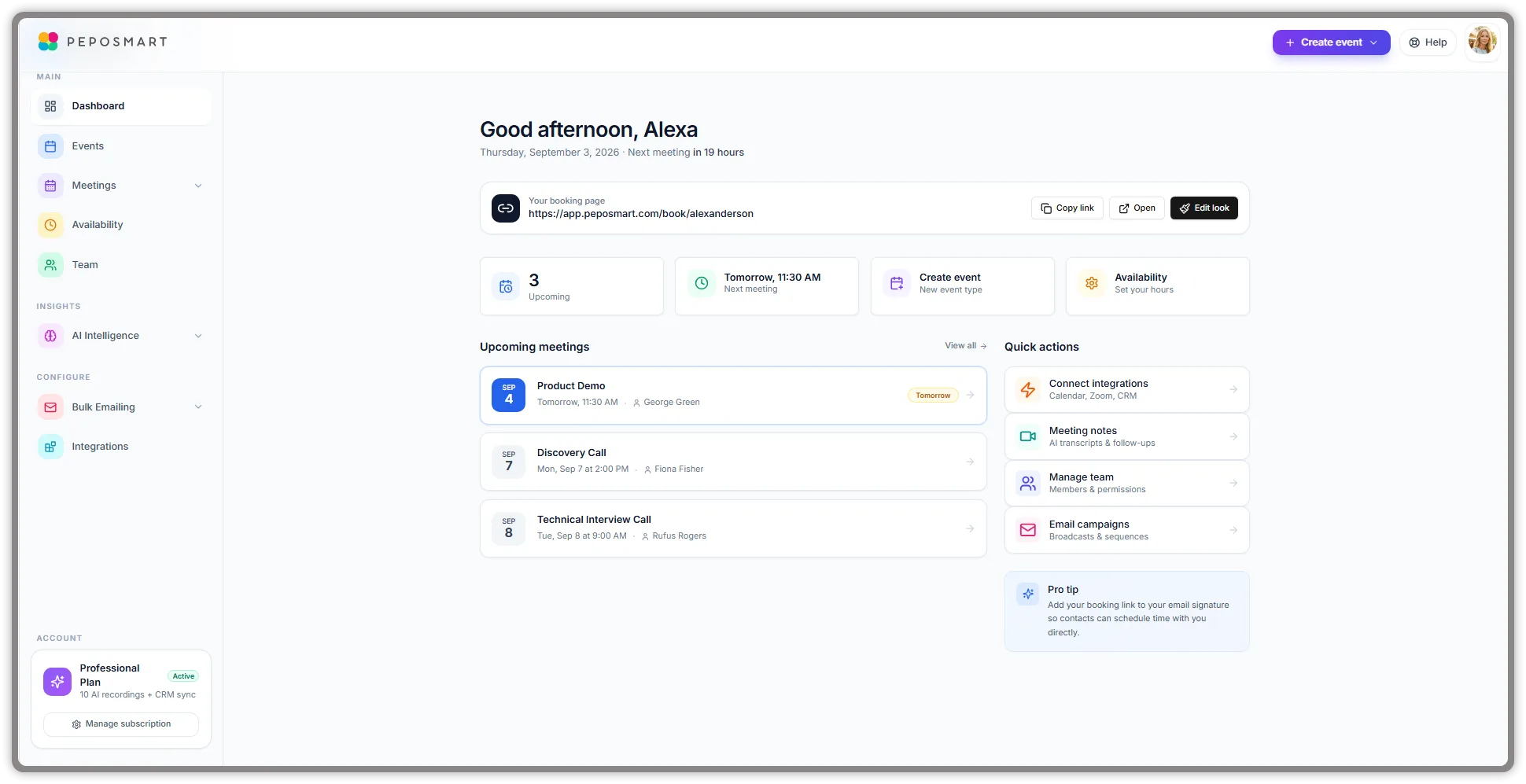
PepoSmart was one of two configurations in this test with a native AI meeting workflow, alongside HubSpot Sales Hub Professional. PepoSmart’s distinction is that the Professional dashboard presents events, availability, meetings, AI intelligence, integrations, payments, and follow-up-oriented features as one focused scheduling-and-meeting workflow.
The booking side supports unlimited booking pages, calendar synchronization, time-zone handling, buffers, custom questions, team events, and customized page designs. For supported Zoom, Google Meet, and Microsoft Teams meetings, the AI notetaker can produce a recording, transcript, summary, and action items. Professional also adds follow-up email drafts, payment collection, automation, and CRM integrations.
What stood out in testing
- Scheduling and meeting intelligence were accessible from the same application rather than two separately administered products.
- The dashboard provided direct access to the public booking page, upcoming meetings, availability, integrations, and meeting notes.
- The Professional account clearly displayed its plan status and CRM access.
- The interface gave the booking workflow and post-meeting workflow comparable visibility.
Genuine strengths
- Native connection between scheduling, meeting records, AI summaries, action items, and follow-up drafts.
- Unlimited booking pages and scheduled meetings across documented plans.
- Booking-page builder with themes, colors, and content widgets.
- Zoom, Google Meet, and Microsoft Teams support for online meetings.
- Ten documented CRM integrations on Professional, including HubSpot, Salesforce, Zoho, Pipedrive, and Close.
- Payment collection through Stripe or PayPal on Professional and above.
Meaningful limitations
- Every plan, including Professional, includes only 2 AI recordings for the lifetime of the account. Further recordings require credit packs (10 for $19, 20 for $27 or 40 for $39), and each credit is valid for 30 days.
- Teams that record most of their calls should budget for credit packs as a recurring cost on top of the per-seat subscription.
- The AI notetaker requires a supported online-meeting link; it cannot join an in-person appointment or ordinary phone call.
- The product has a smaller public review footprint and integration ecosystem than HubSpot, Zoho, or Calendly.
- SSO and SAML are not available today.
Pricing and usage limits
- Basic: $0; unlimited booking pages and meetings; two lifetime AI recordings; one user; recordings retained for seven days.
- Starter: $6/user/month, or $5 annually; AI meeting notes, follow-up drafts, coaching scorecards and recording credit packs.
- Professional — tested: $9.50/user/month, or $8 annually; CRM, payments, automation, and email marketing.
- Business: $29/user/month, or $24 annually; team coaching views, priority support and API access.
- Every paid plan: starts with a 12-month free trial on a new subscription, includes two lifetime AI recordings, and can add recordings with credit packs (10 for $19, 20 for $27 or 40 for $39, each valid 30 days).
Choose PepoSmart if: You want a Calendly replacement with native AI meeting notes and want booking information to continue into follow-up and CRM work.
Choose another product if: You need a very large established app marketplace, mature enterprise procurement controls, or a large recording allowance included in the subscription rather than bought as credit packs.
Official sources: PepoSmart pricing, Plans and Billing, Events and Booking, and Meetings and AI Notes.
2. HubSpot Sales Hub Professional — best for teams already using HubSpot CRM
Best for: Individuals and sales teams that already keep contacts, deals, and activity in HubSpot and want scheduling connected to the CRM.
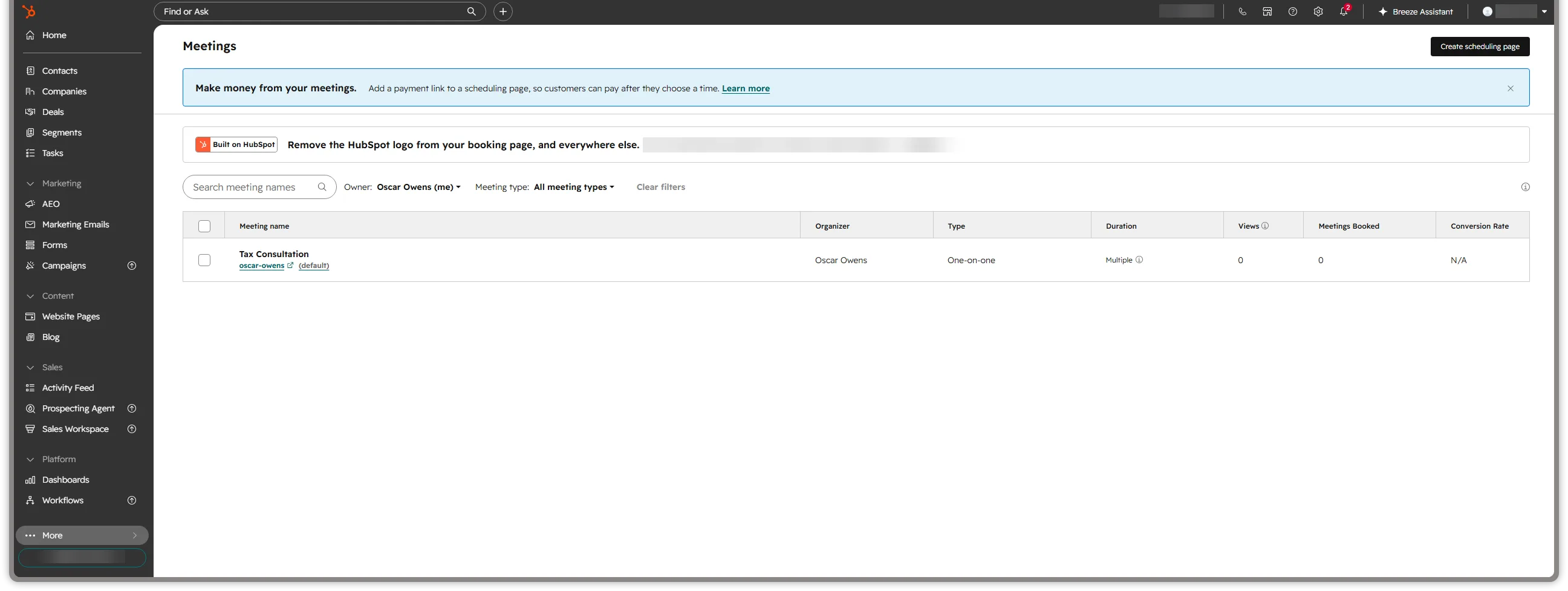
HubSpot Meetings treats scheduling and meeting intelligence as parts of a larger CRM platform. We retested the workflow using Sales Hub Professional and HubSpot’s native Notetaker. Its strongest advantage is CRM context: the meeting, contact, recording, transcript, and summary can remain associated with HubSpot records rather than moving through a separate notetaker account.
What stood out in testing
- The scheduling page lived inside the same interface as contacts, deals, tasks, marketing, and sales tools.
- Native Notetaker captured the meeting and returned its recording, transcript, and summary to HubSpot.
- Group and round-robin pages were available through the paid Sales Hub configuration.
Genuine strengths
- Strong CRM context for organizations already using HubSpot.
- Free entry point remains available for a basic personal meetings link, while Professional provides the tested AI workflow.
- Google and Microsoft calendar connections.
- Official Notetaker supports Zoom, Google Meet, and Microsoft Teams on eligible tiers.
- Paid tiers can connect scheduling, meeting records, automation, pipeline, and reporting.
Meaningful limitations
- Sales Hub Professional currently lists at $90 per seat per month with annual commitment or $100 monthly, plus required one-time Professional onboarding.
- HubSpot provides email reminders in Meetings, but SMS reminders are not a comparable native Meetings feature and require additional messaging/workflow products.
- HubSpot’s “Group” scheduling page is a multi-host collective meeting, not a class-style event that allows many invitees to reserve the same session.
- HubSpot documents a three-hour recording maximum and two-year recording retention. We found no current official source for a previously reported 40-Notetaker-meetings-per-user-per-day limit, so that figure is not included in this comparison.
- Notetaker requires an eligible assigned seat, a connected calendar, and enabled recording/transcription settings.
- HubSpot states that Notetaker is not a Sensitive Data-covered service and cannot support PHI.
Pricing and usage limits
- Sales Hub Free: $0; maximum one branded personal meetings link.
- Sales Hub Starter: currently $7/seat/month, but does not satisfy the published Notetaker eligibility requirement.
- Sales Hub Professional — tested: $90/seat/month with annual commitment or $100 monthly; eligible for Notetaker with the required assigned seat; required onboarding is currently listed separately.
- Sales Hub Enterprise: currently $150/seat/month; additional enterprise features and limits apply.
Choose HubSpot if: Your organization already depends on HubSpot CRM and you value CRM-native scheduling enough to justify the relevant paid tier for AI notes.
Choose another product if: You want native AI meeting notes at a low standalone price or do not want scheduling tied to a broader CRM platform.
Official sources: HubSpot meeting scheduler, HubSpot Notetaker requirements, and Sales Hub pricing.
3. Acuity Scheduling Starter + Fathom Team — best for paid appointments and client intake
Best for: Consultants, coaches, wellness providers, accountants, and appointment-based businesses that collect payment or detailed intake information before a session.
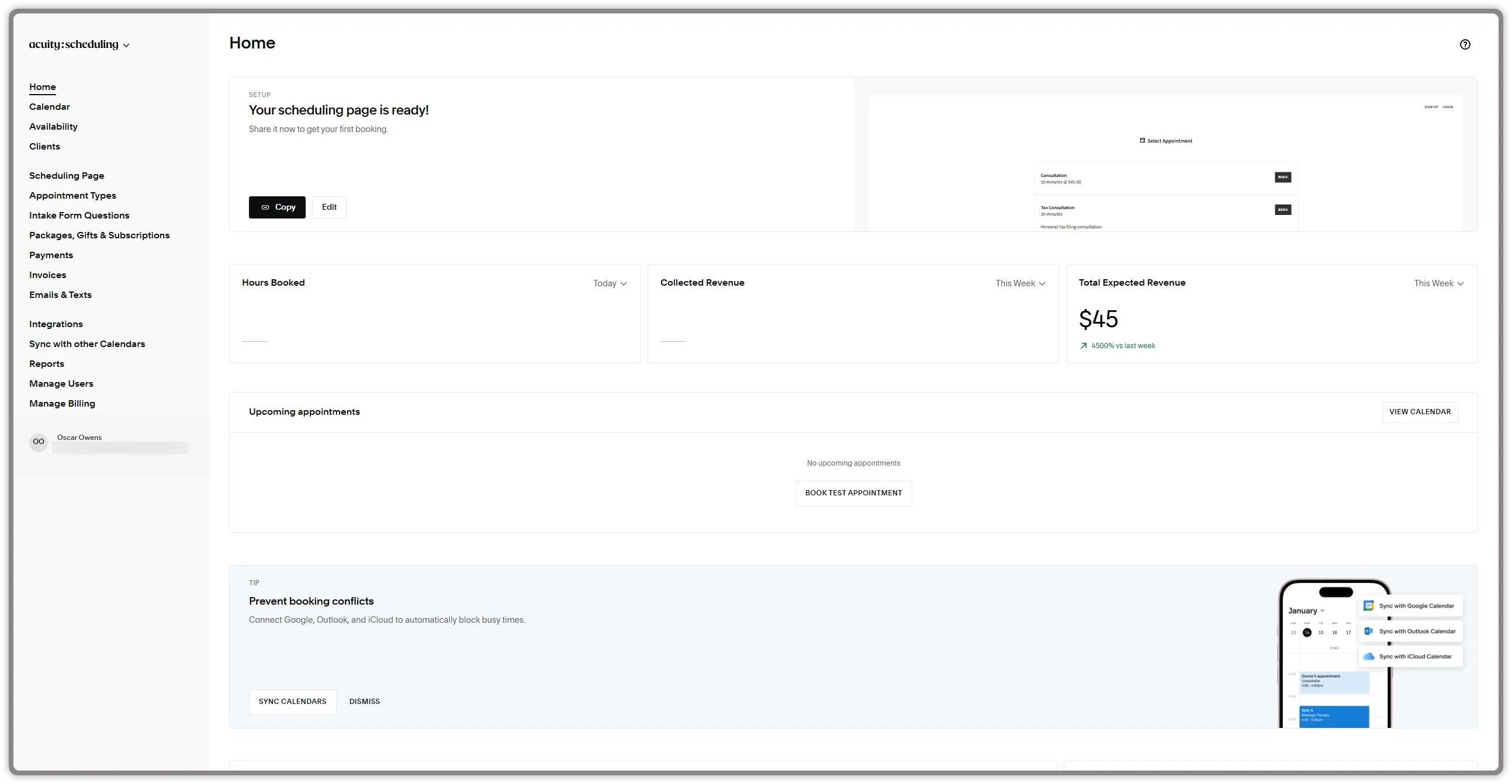
Acuity is designed around services and client appointments rather than only business meetings. Our Starter access showed a scheduling page, appointment types, intake-form questions, payments, invoices, calendar synchronization, and revenue-oriented dashboard areas.
That makes Acuity a meaningful Calendly alternative for paid consultations. We paired it with Fathom Team for recording, transcription, summaries, and action items. The combination worked, but the scheduler and notetaker remain separate products.
What stood out in testing
- Appointment types and intake questions were prominent in the navigation.
- The dashboard surfaced booked hours, collected revenue, expected revenue, and upcoming appointments.
- Payment, package, gift, subscription, and invoicing functions were visibly part of the product structure.
Genuine strengths
- Client intake forms and customizable appointment types.
- Payments and deposits through Stripe, Square, PayPal, and Venmo.
- One calendar and unlimited services and appointments on Starter.
- Google Meet, Zoom, and GoToMeeting integrations.
- Automatic time-zone conversion and email reminders.
Meaningful limitations
- AI notes require Fathom as a second product with separate permissions, billing, retention, and support.
- Acuity Starter has only one calendar, so its pooled round-robin capability requires Standard or another multi-calendar plan.
- Acuity supports group classes but not a true collective event in which multiple required hosts must all be available.
- Starter has one calendar; businesses with multiple staff or locations need Standard or Premium.
- There is no permanent free Acuity plan; the advertised trial is seven days.
- The product can be more operationally detailed than necessary for a simple sales-demo link.
Pricing and usage limits
- Starter — tested access: $20/month, or $16/month billed annually; one calendar.
- Standard: $34/month, or $27 annually; up to six calendars plus SMS reminders, packages, memberships, and gift certificates.
- Premium: $61/month, or $49 annually; up to 36 calendars and more advanced business controls.
- Fathom Team — tested: $15/user/month annually or $19 monthly, with a two-user minimum.
- Minimum recreated annual-billing stack: $46/month before taxes: Acuity Starter at $16 plus two Fathom Team seats at $15 each.
Choose Acuity + Fathom if: Paid appointments, deposits, intake forms, packages, and client administration are priorities and you accept a two-product workflow.
Choose another product if: You want one vendor to own scheduling, recording, summaries, and follow-up.
Official sources: Acuity Scheduling, Acuity pricing, Acuity calendar pooling, and Fathom pricing.
4. Cal.com Free + Fathom Team — best for customization and developer control
Best for: Developers, product teams, marketplaces, and technically capable businesses that want flexible scheduling, APIs, integrations, or a separate community self-hosting option through Cal.diy.
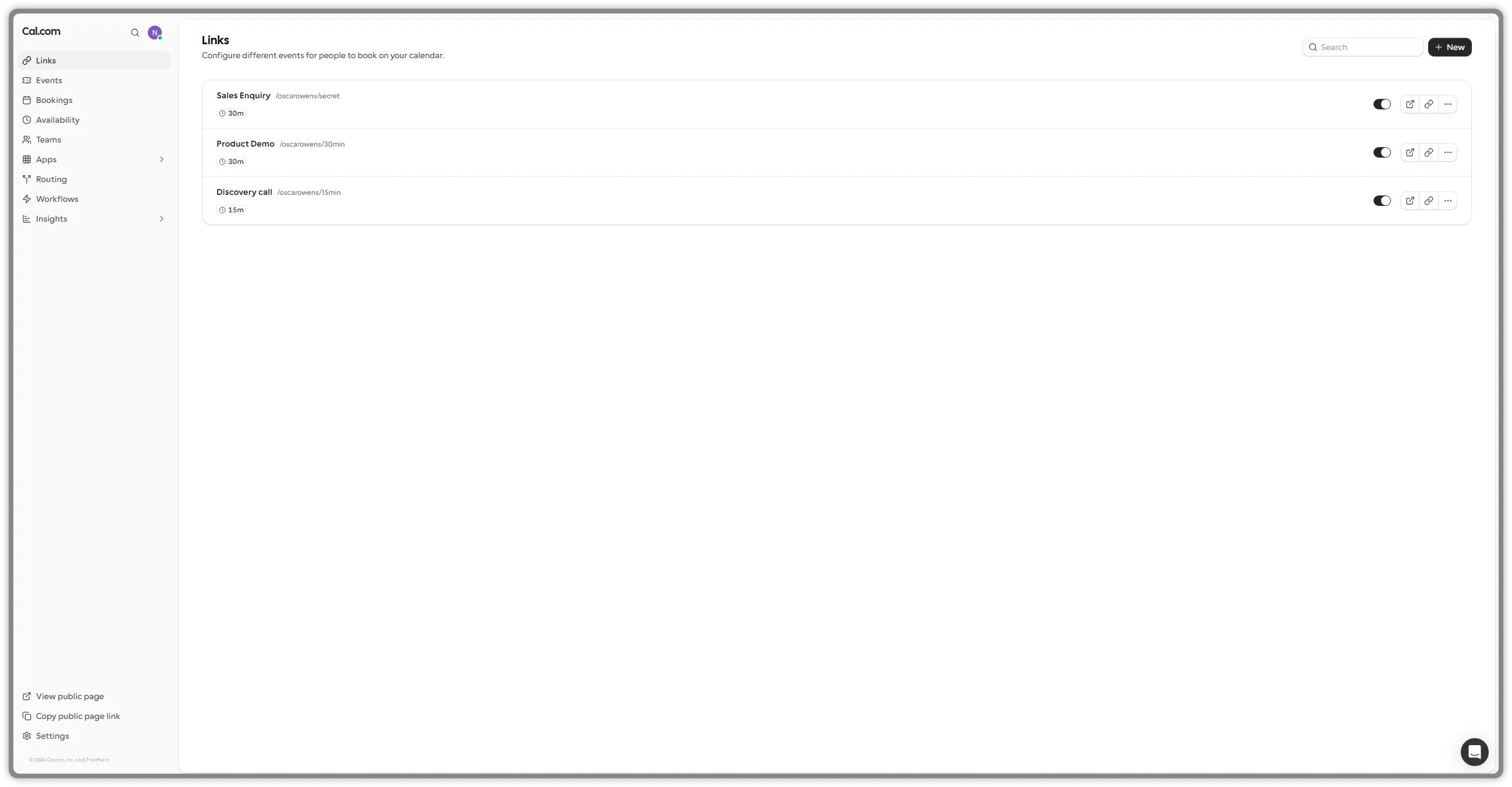
Cal.com’s Free plan provided a clean event-link interface in our test. We created multiple event types and could see direct access to availability, bookings, apps, routing, workflows, and insights. Cal.com is particularly compelling when scheduling needs to become part of a product rather than remain a standalone link.
We connected the Cal.com workflow with our existing Fathom Team account. Fathom supplied the recording, transcript, summary, and action-item layer. Cal.com has also announced native Cal.com Notes for transcribed Cal Video calls on paid plans, but that gradual-rollout feature was not the AI system used in our test.
What stood out in testing
- Creating and enabling multiple event links was straightforward.
- Apps, routing, workflows, and insights were visible from the main navigation.
- The interface was relatively uncluttered despite the product’s technical depth.
Genuine strengths
- Free forever for one user with unlimited event types and calendars.
- More than 100 advertised integrations.
- Stripe and PayPal payments, two-way HubSpot and Salesforce sync, and Calendly import are listed on Free.
- Strong developer tooling, APIs, integrations, routing, and embedding options. Cal.com moved its main production product to closed source in April 2026; the separate MIT-licensed Cal.diy project remains available for community self-hosting but should not be treated as feature-equivalent to the complete hosted platform.
- Paid team plans add shared availability, round robin, routing forms, analytics, and APIs.
Meaningful limitations
- Fathom was tested successfully, but the external notetaker adds operational and privacy complexity.
- Cal.diy self-hosting creates maintenance and security responsibilities and does not provide the complete commercial Cal.com feature set.
- SMS and WhatsApp workflows use messaging credits. Free accounts receive no included credits; Teams receives 750 credits per member per month and Organizations receives 1,000. Additional credits can be purchased, and exhausted balances cause affected messages to fall back to email. Cal.com states that Teams SMS is free in the United States and Canada; other destinations can consume credits according to delivery costs.
- Advanced routing and collaborative scheduling require paid plans.
- Its breadth can create more configuration work than a basic scheduler requires.
Pricing and usage limits
- Free — tested: $0; one user; unlimited event types and calendars.
- Teams: $12/user/month billed annually; one team, round robin, routing forms, analytics, APIs, and removal of Cal.com branding.
- Organizations: $28/user/month billed annually; additional sub-teams, routing, security, permissions, and company controls.
- Fathom Team — tested: $15/user/month annually or $19 monthly, with a two-user minimum.
- Minimum recreated annual-billing stack: $30/month for two Fathom Team seats; Cal.com Free adds no scheduler charge. Cal.com Teams would raise the stack to $42/month for one Cal.com seat plus the two-seat Fathom minimum.
Choose Cal.com + Fathom if: Developer tooling, APIs, customizable routing, embedding, or the separate Cal.diy community self-hosting path matters enough to justify a modular AI-notes stack.
Choose another product if: You want an immediately verified, single-vendor scheduling-and-notes workflow.
Official sources: Cal.com pricing, Cal.com Notes, Cal.com messaging-credit documentation, Cal.com closed-source and Cal.diy announcement, Cal.diy repository, and Fathom pricing.
5. LunaCal + Fathom Team — best for content-rich booking pages
Best for: Consultants, agencies, creators, and service businesses that want their booking page to explain the service and build confidence before someone selects a time.
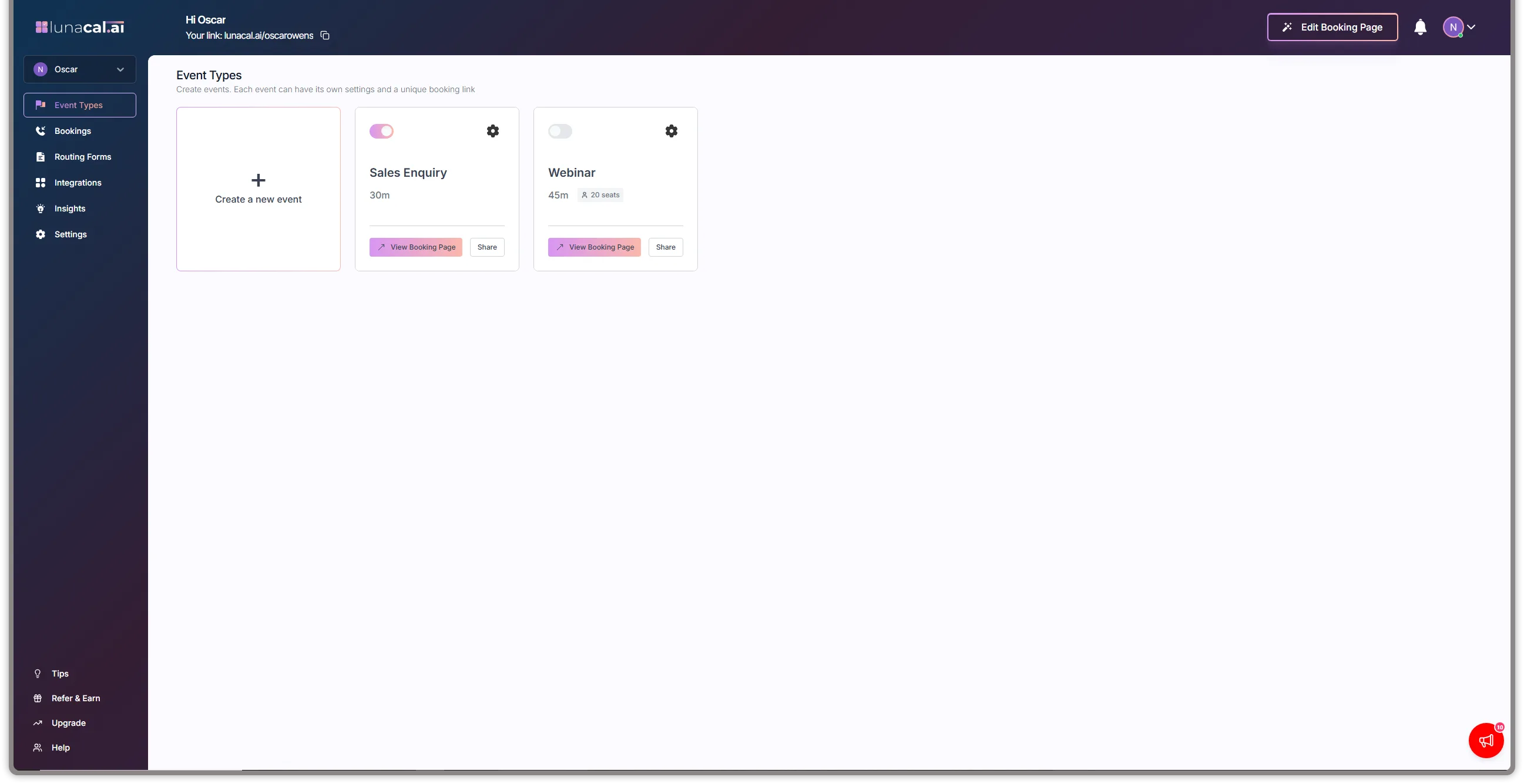
LunaCal emphasizes booking-page presentation. In our access, we created event types and saw a prominent booking-page editor alongside bookings, routing forms, integrations, and insights. This is a useful direction for businesses that want a booking page to function more like a lightweight landing page.
LunaCal did not provide the post-meeting AI notes used in our test. We paired its scheduling workflow with Fathom Team, which handled recording, transcription, summaries, and action items.
What stood out in testing
- The booking-page editor was prominently available from the event-types view.
- Event cards exposed direct booking-page and sharing controls.
- The interface placed visual presentation closer to the core scheduling workflow than many conventional schedulers.
Genuine strengths
- Booking pages can incorporate brand colors and richer supporting content.
- Standard includes unlimited calendars and services.
- Stripe and PayPal payments and text/email reminders are advertised on Standard.
- Teams adds round-robin scheduling, packages, and webhooks.
- Supports Google, Outlook, and Apple calendars according to current pricing information.
Meaningful limitations
- AI notes depended on Fathom Team, creating a two-vendor workflow.
- Round robin and collective scheduling require LunaCal Teams rather than Standard.
- Current public pricing promotes a seven-day trial rather than clearly documenting a permanent Free plan.
- Rich page customization can require more setup and editorial work.
- Its public integration ecosystem and enterprise track record are smaller than those of established platforms.
Pricing and usage limits
- Free/trial access — tested: The test account provided product access, but the current pricing page advertises a seven-day trial rather than a documented permanent Free tier.
- Standard: $9/user/month; unlimited calendars and services, online meeting connection, payments, reminders, and booking-page customization.
- Teams: $15/user/month at the currently displayed promotional annual price; team scheduling, packages, round robin, and webhooks.
- Enterprise: $25/user/month; additional branding, support, and onboarding features.
- Fathom Team — tested: $15/user/month annually or $19 monthly, with a two-user minimum.
- Minimum recreated annual-billing stack: $39/month: LunaCal Standard at $9 plus two Fathom Team seats at $15 each. Team scheduling would require LunaCal Teams and increase the minimum to $45/month.
Choose LunaCal + Fathom if: The presentation and persuasive content around the booking calendar matter and you accept a separate AI meeting assistant.
Choose another product if: You want tested transcripts, summaries, action items, and follow-up within the same scheduling product.
Official sources: LunaCal, LunaCal pricing, and Fathom pricing.
6. Zoho Bookings + Zoho Meeting Professional with Zia — best for Zoho-centric service businesses
Best for: Service businesses already using Zoho CRM, Zoho One, Zoho Meeting, Zoho Mail, or other Zoho applications.
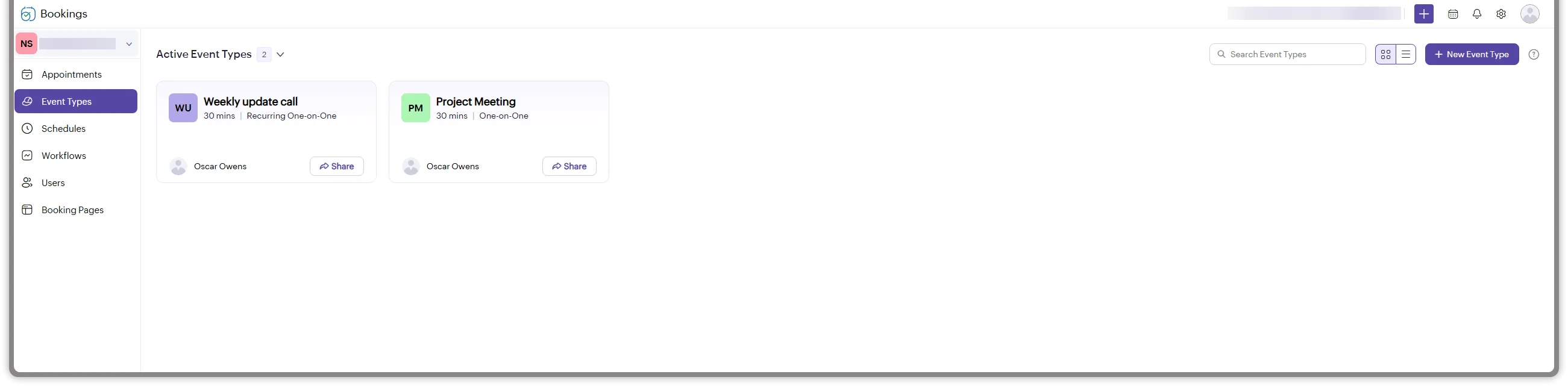
Zoho Bookings provides a service-oriented scheduling structure with event types, appointments, reusable schedules, workflows, users, and booking pages. Our test account contained recurring one-on-one and standard one-on-one event types.
Zoho’s wider ecosystem is its biggest advantage. We used Zoho Bookings for scheduling and Zoho Meeting Professional with Zia for transcript-based AI keynotes. This is a first-party Zoho ecosystem combination, but the AI output is produced in Zoho Meeting—not natively inside Zoho Bookings.
What stood out in testing
- Event types, schedules, workflows, users, and booking pages had clear dedicated navigation.
- The product supported both recurring and standard one-on-one event types in the test account.
- The interface was oriented toward service operations rather than only sales meetings.
Genuine strengths
- Forever Free option for one user with online meetings, email notifications, reminders, and two-way calendar sync.
- Multiple scheduling algorithms, including round robin and priority-based distribution, on eligible plans.
- One-on-one, collective, recurring, group, and resource-booking models.
- Connections to Zoho CRM, Bigin, Zoho Flow, payment providers, and meeting tools.
- Customizable booking pages and service-oriented workflows.
Meaningful limitations
- The workflow spans separate Zoho products and administration surfaces.
- Zoho documents that Zia keynote generation can send meeting transcript text to OpenAI when that integration is enabled; organizations should review this data flow and DPA requirements.
- Our test account was on a 15-day trial, so it cannot prove that every visible capability is included in Forever Free.
- Zoho’s official pages were not fully aligned during our September 5 recheck. Some official pages continued to identify or price Basic and Premium, while the current pricing experience also presented Flex as a contact-sales offering. Buyers should verify the plans and checkout prices shown for their region.
- The breadth of the Zoho ecosystem can take time to configure for businesses that do not already use it.
Pricing and usage limits
- Forever Free: one user, online meetings, notification emails and reminders, and two-way Zoho/Google/Microsoft calendar sync.
- Paid Zoho Bookings plans: official pages presented Basic, Premium, and Flex information inconsistently during our recheck. Treat any quoted Basic or Premium figure as provisional until it appears in the buyer’s regional checkout; Flex may require contacting sales.
- Zoho One: Zoho states that customers have access to Zoho Bookings Premium.
- Trial access shown in tested account: 15 days remaining at capture, so observations reflect trial access.
- Zoho Meeting Professional — tested: pricing varies with participant capacity and billing selection; check your regional checkout for a precise total.
Choose Zoho Bookings + Zoho Meeting/Zia if: Your business already operates in Zoho and wants scheduling and AI keynotes within the broader Zoho ecosystem.
Choose another product if: Native AI meeting capture and summaries are a primary requirement and you do not want to add an external assistant.
Zoho publishes Bookings features and guidance intended to help customers meet GDPR obligations. This is not an independent certification of every customer configuration: organizations remain responsible for establishing a lawful basis, collecting appropriate consent, configuring data handling, and reviewing the Zoho Meeting and OpenAI data flow used by Zia.
Official sources: Zoho Bookings, Zoho Bookings pricing, Zoho Bookings plan comparison, Zoho Meeting pricing, and Zia for Zoho Meeting.
Which Calendly alternative should you choose?
- Choose PepoSmart Professional when the deciding requirement is one tested product for scheduling, AI meeting notes, action items, follow-up drafts, and CRM workflow.
- Choose HubSpot Sales Hub Professional when you already use HubSpot CRM and can justify the higher subscription and onboarding cost for native Notetaker.
- Choose Acuity + Fathom Team when you sell appointments and need payments, deposits, intake forms, or classes alongside external AI notes.
- Choose Cal.com + Fathom Team when APIs, routing, embedding, or the separate Cal.diy community self-hosting option drive the decision.
- Choose LunaCal + Fathom Team when the booking page should communicate context, proof, and brand personality before the prospect books.
- Choose Zoho Bookings + Zoho Meeting/Zia when your team already relies on Zoho and prefers a multi-product Zoho ecosystem workflow.
If AI notes are mandatory, do not compare only the scheduler’s subscription price. Compare the complete cost and workflow needed to schedule, capture, summarize, search, share, and act on the meeting.
Native AI meeting notes versus a separate notetaker
We tested native AI workflows in PepoSmart and HubSpot, a separate Fathom Team layer with Cal.com, Acuity, and LunaCal, and a cross-product Zoho Bookings plus Zoho Meeting/Zia workflow. A modular combination can be effective, but it is not operationally equivalent to a native workflow.
Before combining a scheduler with a meeting assistant, verify:
- Whether the assistant detects meetings created by every booking page.
- Whether rescheduled or canceled bookings update the assistant correctly.
- Whether the bot joins Zoom, Google Meet, and Microsoft Teams consistently.
- Whether the host must manually admit it from a waiting room.
- Whether participants receive clear recording notice and consent controls.
- Whether the transcript is associated with the correct customer and event.
- Whether meeting summaries and action items reach the CRM automatically.
- Whether users must copy information between applications.
- Whether storage, retention, deletion, and data residency meet your requirements.
- The combined price for scheduler seats, notetaker seats, AI credits, video recording, integrations, and storage.
- Which vendor is responsible when the integration fails.
A two-product stack can provide more flexibility. A native platform can reduce handoffs and administration. Neither architecture is automatically better for every business.
Detailed testing methodology
Testing was completed on September 3, 2026 using the configurations shown in the test table. The tester created appointment or meeting types and evaluated starting paid prices, email and SMS reminders, paid meetings, booking-page themes, round-robin assignment, group sessions, collective scheduling, and available GDPR information. AI workflows were tested in PepoSmart Professional, HubSpot Sales Hub Professional, Fathom Team paired with Cal.com/Acuity/LunaCal, and Zoho Meeting Professional with Zia paired with Zoho Bookings.
Scheduling workflow
We evaluated whether the tested account could:
- Create a one-on-one appointment or meeting type.
- Set a name, duration, location, and availability.
- Produce a link or public scheduling page.
- Expose useful controls for calendars, intake questions, reminders, payments, teams, routing, or workflows where the tested plan allowed.
- Provide a manageable administrator experience for a small business or customer-facing team.
AI workflow
For every configuration, we verified that a scheduled online meeting could reach the selected AI-note workflow and return a transcript or summary. We also examined whether the AI layer was native to the scheduler, native to a separate product from the same vendor, or supplied by Fathom Team.
We did not run a controlled word-error-rate test, use the same recorded conversation across every platform, or calculate statistically meaningful accuracy. The ratings therefore reflect workflow capability and usability, not laboratory-measured transcription accuracy.
What this test did not establish
- A statistically meaningful reliability rate.
- Comparative transcript or summary accuracy under controlled audio conditions.
- Long-term performance under high booking volume.
- Enterprise security, accessibility, compliance, or support-response validation.
- Legal certification of GDPR compliance or the sufficiency of each vendor’s DPA for a particular organization.
- Long-term reliability of calendar-to-notetaker handoffs after reschedules, cancellations, or administrative changes.
Correction and update policy
Scheduling and AI products change frequently. We review official pricing and product documentation at least once every three months and repeat hands-on testing when a material workflow or plan changes.
Readers and vendors can report a factual error to [email protected]. Please include the disputed statement and a current official source. We will investigate material correction requests, update the article when warranted, record the correction date below, and never accept payment for a ranking change or removal of a documented limitation.
Correction log
- September 4, 2026: Rebuilt the original ten-product research draft around six tested configurations.
- September 4, 2026: Added repeat-test findings for reminders, payments, themes, team scheduling, GDPR information, HubSpot Professional Notetaker, Fathom Team integrations, and Zoho Meeting/Zia. Added transparent editorial ratings and full-stack pricing.
- September 5, 2026: Rechecked disputed claims against current official sources. Clarified Cal.com’s closed-source production product and separate Cal.diy project, documented Cal.com messaging-credit limits, removed the unverified HubSpot 40-meetings-per-day figure, qualified PepoSmart SMS and Zoho GDPR wording, noted conflicting Zoho paid-plan presentation, and updated Fathom pricing links.
- September 25, 2026: Updated PepoSmart prices, plan names and AI recording allowances to the current plans: 2 lifetime recordings on every plan with credit packs for more, and a 12-month free trial on every paid plan.
Primary official sources checked
- PepoSmart pricing
- PepoSmart Plans and Billing
- PepoSmart Meetings and AI Notes
- HubSpot meeting scheduler
- HubSpot Notetaker documentation
- HubSpot Sales Hub pricing
- Cal.com pricing
- Cal.com Notes
- Cal.com messaging-credit documentation
- Cal.com closed-source and Cal.diy announcement
- Cal.diy repository
- Acuity Scheduling pricing
- Acuity calendar pooling and round robin
- LunaCal pricing
- Zoho Bookings pricing
- Zoho Bookings plan comparison
- Zoho Bookings GDPR guidance
- Zoho Meeting pricing
- Zia for Zoho Meeting
- Fathom pricing
- Fathom security and GDPR information

